Baby School: The Casual Display Font That Balances Fun and Function
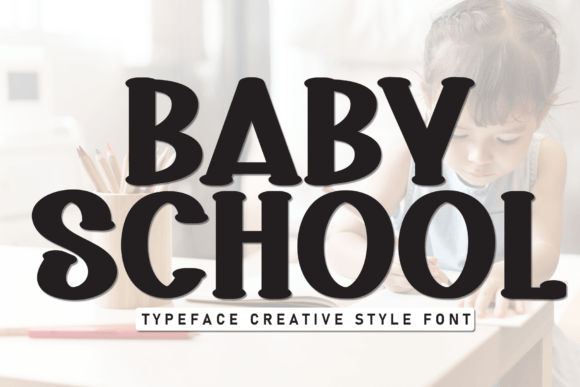
If you are looking to inject a sense of summer relaxation into your next project, Baby School is likely the typeface you have been searching for. This neat and casual display font radiates fun and relaxation through its clean lines and easygoing vibe. It is not merely a decorative element; it is a strategic tool that brings a breezy, laid-back feel to any creative project or message. Whether you are designing event flyers, summer posters, or playful branding for a small business, this cheerful typeface can transform a stiff layout into something inviting.
However, while the aesthetic appeal of Baby School is undeniable, many creators fall into traps when integrating it into their workflow. Choosing a display font like this requires more than just liking how it looks in isolation. You must consider legibility, context, and technical implementation to ensure your design communicates effectively rather than confusing your audience. Let us explore the common pitfalls associated with this font and how to navigate them successfully.
The Trap of Overusing Playful Typography
A frequent mistake designers make is assuming that because a font is "fun," it should be used for everything. Baby School has a distinct personality. It works beautifully for headlines, short phrases, and thematic elements where you want to evoke a specific mood. However, using it for long blocks of text is a recipe for reader fatigue. The unique character shapes and the casual nature of the letters make it difficult to scan quickly over paragraphs.
When you apply Baby School to body copy, you risk reducing readability significantly. Adults aged 20 to 50, who form the core of most digital audiences, expect content to be scannable. If they struggle to decipher your words because the font is too whimsical, they will leave your page or flyer. This directly impacts your conversion rates and the efficiency of your communication. Instead of trying to force the font to do heavy lifting, reserve it for titles, logos, and key call-to-action buttons. Pair it with a neutral, highly legible sans-serif for the supporting text to create a balanced hierarchy.
Misjudging Scale and Weight
Another oversight involves ignoring the scale at which the font appears. Because Baby School features clean lines and open counters, it often looks charming at large sizes. However, shrink it down for a mobile menu or a tiny caption, and those same clean lines can become blurry or indistinct. In digital environments, especially on smaller screens, the "neat" aspect of the font can degrade if the resolution is low or the size is too small.
To avoid this, always test your designs across different devices before finalizing. Check how the letters look on a smartphone screen versus a desktop monitor. If the details get lost, you may need to increase the font size or switch to a simpler weight for smaller applications. A good rule of thumb is to use Baby School only when the letter height is substantial enough to maintain its character definition without pixelation.
Contextual Mismatch and Brand Consistency
One of the most critical errors in typography selection is failing to align the font with the brand's voice. While Baby School is perfect for a children's party invitation or a beach resort promo, it might undermine the authority of a financial consultant or a legal firm. The "breezy, laid-back feel" it provides is a double-edged sword; it can alienate an audience seeking seriousness or professionalism.
Before downloading or purchasing the font, ask yourself what emotion you want to convey. If your goal is to build trust in a high-stakes environment, this playful typeface might send the wrong signal. Conversely, if you are launching a new line of organic summer snacks, the font's relaxed vibe is exactly what you need to connect with consumers. The mismatch between the font's personality and the brand's identity can lead to confusion and a lack of satisfaction among your target demographic.
- Check your audience: Are they looking for entertainment or information? Baby School leans heavily toward entertainment.
- Review your competitors: See what fonts similar businesses use. If everyone else uses serious serifs, using Baby School could help you stand out, but only if the context supports it.
- Consider the medium: Does this font work well on packaging, billboards, and social media thumbnails simultaneously?
Technical Oversights in Downloading and Licensing
Many users rush to download free versions of popular fonts without reading the license terms carefully. With Baby School, as with any commercial typeface, understanding the usage rights is essential. Some licenses allow for personal use but require a separate purchase for commercial projects like client work or branded merchandise. Ignoring these details can lead to legal issues and unexpected costs later on.
Furthermore, ensure you are obtaining the font from a reputable source. Unofficial downloads often come with corrupted files, missing glyphs, or embedded malware. A corrupted font file can crash your design software, wasting hours of work. Always verify the file integrity by opening it in your preferred application and checking that all characters render correctly. If you are a freelancer or agency owner, maintaining a library of verified, properly licensed fonts protects your reputation and your clients' interests.
Practical Strategies for Better Implementation
To get the most out of Baby School, adopt a strategy that prioritizes clarity alongside style. Start by creating a simple style guide that defines exactly where this font can and cannot be used. For instance, designate it strictly for H1 headers and logo lockups. This discipline ensures that the font remains a highlight rather than becoming background noise.
Pairing is another area where creativity meets necessity. Since Baby School is a display font, it needs a reliable partner for body text. Look for a geometric sans-serif or a clean humanist font that complements the rounded edges of Baby School without competing with it. The contrast between the playful header and the neutral body text creates a professional yet approachable look. This combination satisfies the need for visual interest while maintaining the usability required for effective communication.
- Test for accessibility: Ensure your color contrast ratios meet WCAG standards, especially since the unique shapes of the font might reduce legibility against certain backgrounds.
- Use kerning wisely: Display fonts often have specific spacing requirements. Adjust the tracking slightly tighter or looser depending on the length of the headline to ensure the rhythm feels natural.
- Keep it simple: Avoid mixing multiple display fonts. Let Baby School be the star of the show without distraction.
Evaluating Your Design Choices
Before you finalize any project featuring Baby School, step back and evaluate the overall impact. Ask a colleague or a potential user to glance at your design for five seconds. Can they tell what the main message is? Do they understand the tone? If the answer is no, the font might be overpowering the content. Remember that the best design is invisible; it guides the eye naturally without shouting for attention.
By avoiding these common mistakes and focusing on practical application, you can harness the full potential of this cheerful typeface. Whether you are a blogger crafting a summer post, a marketer designing a campaign, or a hobbyist creating a birthday card, Baby School offers a delightful way to express warmth and ease. Just remember that the secret lies not just in the font itself, but in how thoughtfully you integrate it into your broader design ecosystem.
Take the time to experiment, test, and refine. When done correctly, Baby School does more than just look nice; it sets the right emotional stage for your message, ensuring your audience feels relaxed and engaged from the very first glance.